
Convert WMV to MP3 or WMA
How can I convert a WMV video file to an MP3 or WMA that I can listen to on my Sansa MP3 player?"
As with most media conversion problems, I recommend using free video converter WinFF. The app is among the most reliable solutions I've found for converting between all kinds of media formats. It's generally very fast at stripping the audio out of a video and converting it to WMA or MP3.
Converting WMV to MP3 or WMA with WinFF
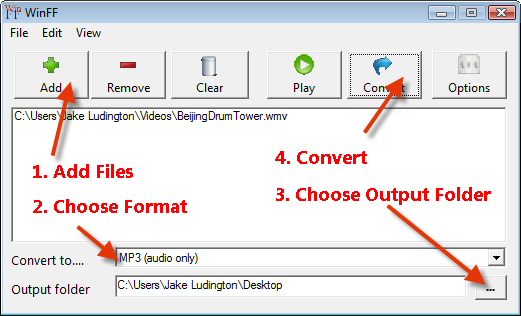
1) After downloading and installing WinFF, launch the application and select the WMV file or files you want to convert to MP3. 2) Choose the MP3(audio only) option from the Convert to... menu. 3) Pick a Output folder to save your file(s). 4) Start Converting.
If you want to convert the files to WMA, you'll need to add a preset to WinFF following the steps on Configuring WinFF to Convert to WMA. This tutorial should work for both Linux and Windows.


0 comments:
Post a Comment